1. Confirm the exercise and reporting scope
The EBA EU-wide stress test and the ECB’s parallel SSM stress test are related exercises. The ECB describes the SSM test as using EBA methodology with adjustments for smaller banks outside the EBA sample. That relationship does not make every workbook or reporting instruction interchangeable. See the ECB’s explanation of EBA and SSM stress tests.
Ask the vendor to identify the exact exercise, template version, worksheet profiles and output format it supports. “EBA reporting” is too broad to establish compatibility: a stress-test workbook is a different deliverable from recurring COREP or FINREP taxonomy-based reporting.
Halden’s current scope: EBA Filler 0.10.4 supplies template-specific profiles for the provided EBA 2027 draft workbook. An ECB/SSM workbook or a changed final EBA version needs an explicit compatibility review before use. Halden is independent software, with no claimed EBA or ECB approval.
2. Distinguish template filling from filing
| Task | Typical output | What to verify |
|---|---|---|
| Stress-test Excel template filling | A populated workbook retaining the prescribed structure and formulas. | Mapping, units, selectors, coverage, recalculation and value lineage. |
| An Excel add-in | Depends on the add-in: workbook assistance, taxonomy validation or a filing file. | The actual exercise supported, required Excel versions, approval and audit features. |
| XBRL or XBRL-CSV filing | A machine-readable report against a specified taxonomy. | Taxonomy version, validation rules, filing format and delivery requirements. |
A product can cover several of these tasks, but confirm each one separately. Halden EBA Filler is a desktop workbook-mapping application, not an Excel add-in. Its documented output is a filled stress-test Excel workbook; COREP/FINREP XBRL generation is outside this workflow.
Compare software on the deliverable you need. A taxonomy validator does not by itself prove how a bank’s model output reached a stress-test cell, and a filled workbook does not by itself constitute an XBRL filing.
3. Test a representative mapping
Bring a small anonymised source extract and the real target template to the demonstration. Include several countries, baseline and adverse scenarios, and more than one period if those dimensions appear in your exercise.
- Map a value, then inspect the source, unit conversion, sign and destination.
- Refresh the source file and rerun the saved mapping.
- Introduce a conflicting destination and see how the tool reports it.
- Check a selector, a formula cell and a blank-versus-zero case.
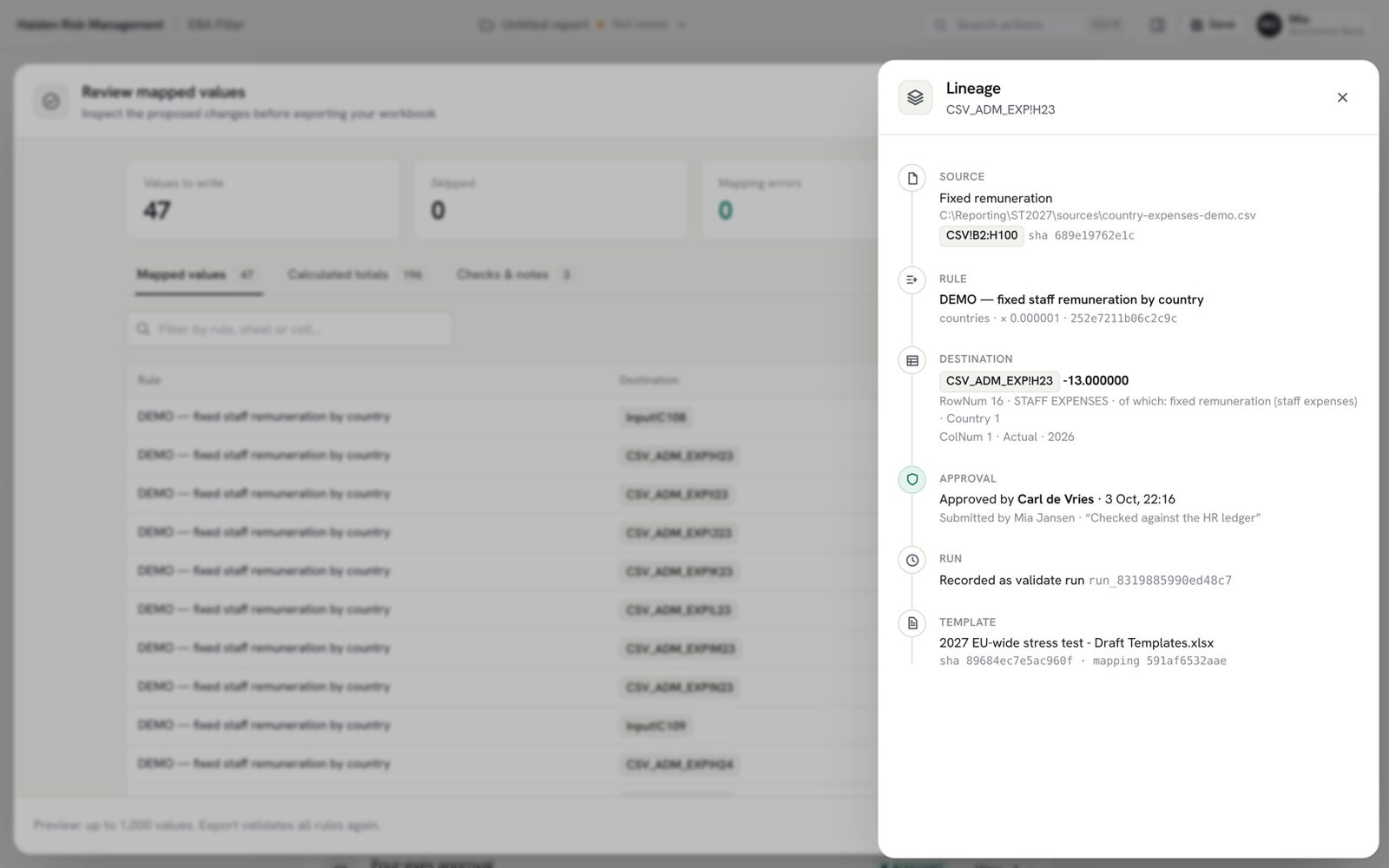
- Trace the exported value back to the rule and original file.
In Halden, cell and block rules make the mapping reusable, while source labels let refreshed files take the place of previous-cycle inputs. Multiple mappings can be combined with their origins retained and overlaps reviewed. The template-filling walkthrough explains that process step by step.
4. Ask what approval actually covers
Ask the vendor to show the maker, checker, version and approved output together. A generic “reviewed” status is less useful if a rule can change afterwards without the approval becoming stale.
Halden’s team workflow binds checker approval to the exact mapping version. The exported values retain lineage to sources, rules and the run. Local mode remains available, with the bank responsible for its separate approval process.
Validation coverage also needs a precise answer. Halden checks implemented mapping and template semantics and supported draft guidance checks. The bank retains responsibility for completeness, applicability, Excel recalculation and final supervisory submission review.
5. Review deployment and data handling
Confirm where source files are read, what a team server stores and whether any optional AI request includes selected values. Ask IT to review identity-provider integration, rollout, network requirements and the supplied installer.
Halden processes workbook and source data on the user’s computer. The optional server supports accounts, approvals, run records and the audit log. Manual mapping does not require AI. When the assistant is used, a request preview and consent precede sending; the organisation can configure a local model endpoint.
Review the security and deployment information and IT & Security Pack with your own policies. A pilot should establish the actual deployment and supported workbook, not rely on a product label alone.
6. Agree a pilot with a reviewable outcome
Define the template version, source files, reporting dimensions, checks and approval path for the pilot. Include an exported workbook, a sample of traced values and a list of remaining bank inputs in the acceptance criteria.
Explore the Halden EBA filling tool for its current release and tutorial. If your team also needs scenario generation, model runs and capital reporting, the complete EBA stress-testing workflow shows how those products hand results to the filler.
For an ECB/SSM use case, send the exercise and template version to sales@haldenrisk.com first. Do not share confidential bank or customer data through the public contact form.